

The IRAP report and Cloud Controls Matrix are the two documents produced at the end of every cloud system assessment. Together they give an authorising officer everything needed to make an informed risk-based decision about whether to authorise the system. Understanding what each document contains, who it is written for, and how to read the findings is the difference between an organisation that can act on its assessment and one that files it and waits to be told what to do next.
Stackform’s journey
When the draft report arrived, James Hartley, the CISO at Stockform, spent an hour reading the executive summary and then stopped. The document was longer than he expected, structured in a way he had not seen before, and dense with control-by-control observations he did not immediately know how to prioritise. He called Cybernion and asked where to start.
The answer was: understand what the two documents are for before reading either of them in detail.
Two documents, two audiences
An IRAP assessment for a cloud system produces two deliverables. The Security Assessment Report, referred to in the cloud context as the Cloud Security Assessment Report, is written for authorising officers, system owners, and risk owners. It describes the system, the assessment process, the findings, and the recommendations in narrative form. The Cloud Controls Matrix, or CCM, is written for technical personnel and system administrators. It contains the row-by-row control assessment observations that the report summarises.
Neither document stands alone. The CCM is the evidence layer. The report is the interpretation layer. An authorising officer reads the report to understand the security posture of the system and uses the CCM to verify the detail behind any finding they want to examine more closely.
IRAP Report
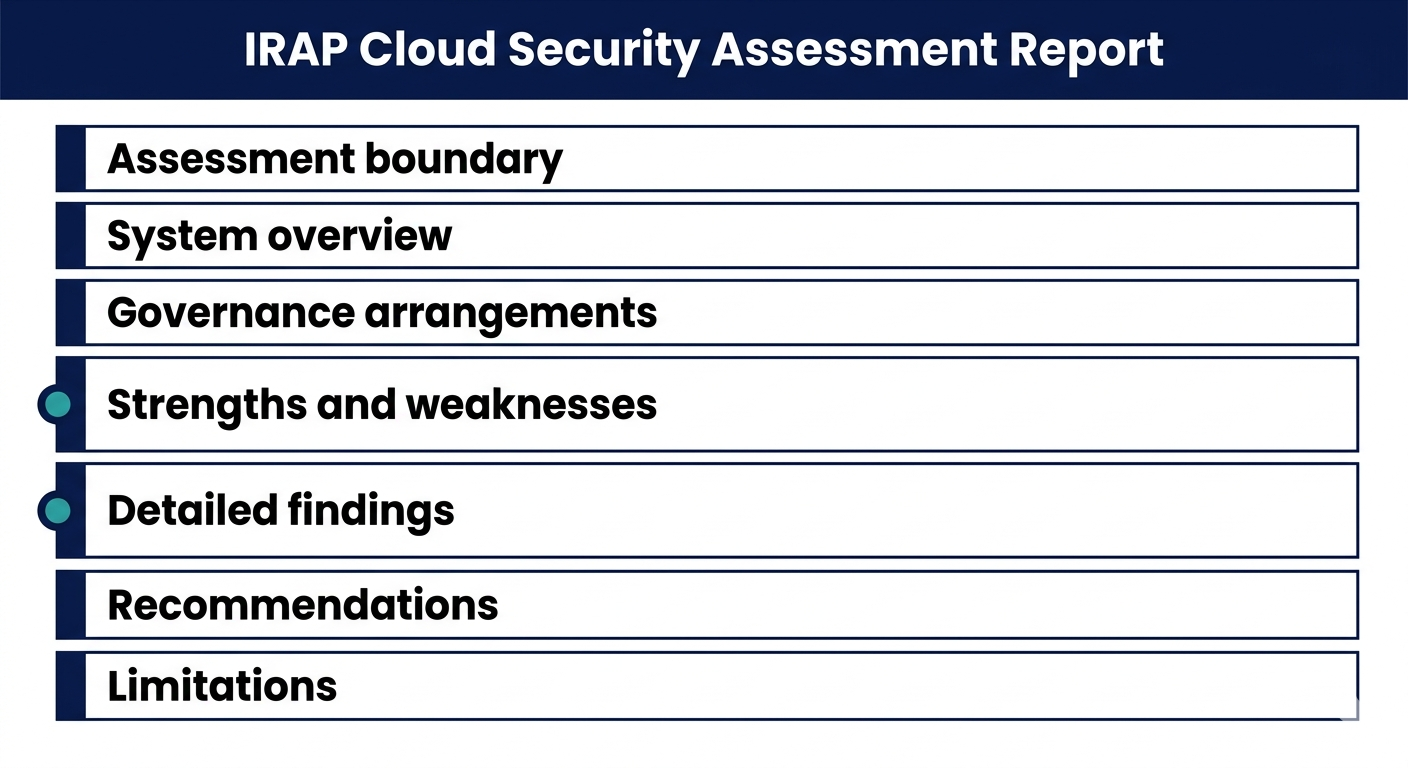
The IRAP report follows a defined ASD template structure. At a high level it covers the following areas.
- The assessment boundary section documents exactly what was in scope and what was excluded, with justification for each exclusion. This is the first section to read because it determines the validity of everything that follows. If the boundary was too narrow, the report’s coverage is limited, and that limitation needs to be understood before the findings are reviewed.
- The system overview describes the system’s function, environments assessed, architecture, data flows, and the classification of information handled. For Stackform this included the production and pre-production environments, the identity provider configuration, and the privileged access workstation setup.
- The governance section covers the organisational arrangements around the system: ownership, roles, responsibilities, and the risk management approach the organisation has used.
- The strengths and weaknesses section is where the report provides its headline assessment of the system’s security posture. Strengths are areas where controls are operating effectively. Weaknesses are areas where controls are ineffective, not implemented, have no visibility, or where the assessor has identified a vulnerability. Key vulnerabilities must be identified clearly and as early as possible in the report so they are not buried.
- The findings section contains the detailed observations behind the weaknesses, with supporting context and evidence references. Each finding is tied to one or more ISM controls and describes what was observed, what the gap is, and what the potential impact is. The assessor describes impact but does not rate risk. Risk rating is the organisation’s job, and ultimately the authorising officer’s.
- The recommendations section provides remediation guidance. Recommendations are descriptive rather than prescriptive. The assessor explains what needs to be addressed and why, without dictating the specific technical solution. The organisation decides how to implement.
- The limitations section documents any constraints that affected the assessment, such as controls that could not be fully tested due to access restrictions or evidence gaps. Where limitations exist, the affected controls are noted and their outcomes reflect the constraint.
Cloud Controls Matrix
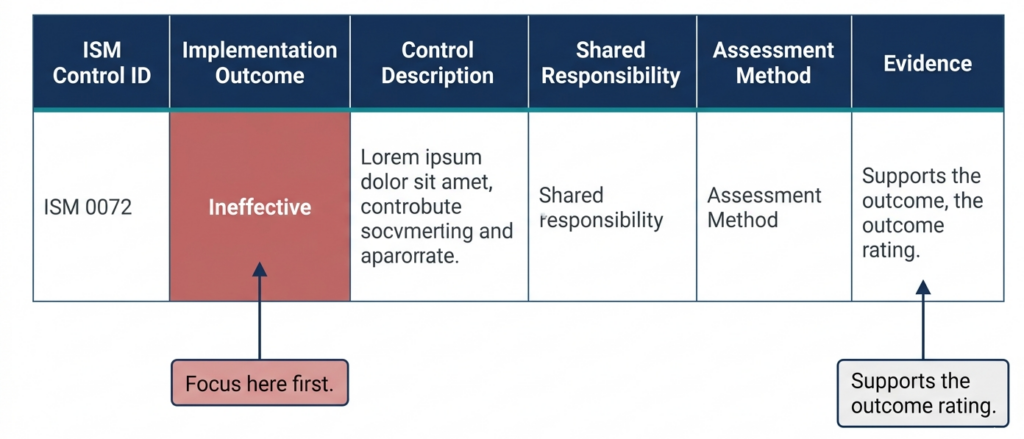
The CCM is a row-by-row record of every applicable ISM control assessed within the boundary. For each control, the CCM records the implementation outcome, a description of how the control is implemented in the system, the responsibilities between the organisation and any external service providers, the assessment method used, and the evidence gathered.
This is the working document for the organisation’s technical team. After the assessment, it becomes the reference point for understanding what controls are in place, which are gaps, and who is responsible for what across the shared responsibility model.
Reading the CCM effectively means focusing first on the controls rated Ineffective, Not Implemented, and No Visibility. These are the gaps that need to be addressed or accepted. Controls rated Not Applicable should be reviewed to confirm the justification is sound. Controls rated Alternate Control should be examined to understand what the alternate mechanism is and whether it genuinely meets the intent of the ISM control.
No Visibility warrants particular attention. It means the assessor could not obtain adequate visibility of the control’s implementation. From a risk perspective, authorising officers may treat No Visibility as equivalent to Ineffective. Where this outcome appears, the organisation needs to understand why the assessor could not see the control and whether the gap is an evidence problem or an implementation problem.
No risk rating
This point sits at the centre of how to read the report correctly. The assessor describes findings and their potential impact. They do not assign a risk rating. They do not say a finding is critical, high, medium, or low. They do not recommend whether the system should be authorised.
The risk rating and the authorisation decision belong to the organisation and the system authoriser. The report gives them the information to make that decision. It does not make it for them.
James found this disorienting at first. He had expected the report to come with a clear verdict. Instead it came with a detailed picture of the system’s security posture and left the interpretation to the agency. That is by design. What the report does do is surface the information an authorising officer needs to determine whether the residual risk is within their organisation’s risk appetite.
Sharing the report
The assessed entity is expected to make the IRAP assessment report and CCM available to other organisations considering the use of their services. An assessment cover letter alone does not give a potential consumer enough information to understand the security risks involved. The full report and CCM need to be accessible.
For service providers like Stackform, this means the report is not a private document. It is evidence provided to consuming agencies to support their own risk-based decisions. Marketing language that implies certification, approval, or authorisation based on the report is not permitted under ASD’s guidelines.
What Stackform did next
James and the Cybernion team reviewed the CCM together, row by row, focusing on the non-effective outcomes. Two controls rated No Visibility were addressed by producing the missing evidence. Three controls rated Ineffective had a remediation path. One control was Not Implemented with a documented business constraint that the agency would need to consider as a residual risk.
With that understanding in place, the next task was assembling the authorisation package.
Frequently Asked Questions (FAQs)
What is the difference between the assessment report and the Cloud Controls Matrix?
The assessment report is a narrative document for authorising officers and risk owners. It describes the system, the assessment findings, and the recommendations. The CCM is a technical document for system administrators. It records the outcome, implementation description, evidence, and assessment method for every applicable ISM control. Both are produced at the end of the assessment and should be read together.
Where should we focus first when we receive the report?
Start with the boundary section to confirm scope, then go to the strengths and weaknesses section for the headline picture. In the CCM, focus on controls rated Ineffective, Not Implemented, and No Visibility. These are the gaps that need to be addressed or formally accepted as residual risks.
Does the assessor tell us which findings are most serious?
The assessor describes the potential impact of each finding but does not assign a risk rating. The organisation and the system authoriser determine what level of risk is acceptable. Key vulnerabilities should be identified prominently in the report, but the prioritisation is the organisation’s responsibility.
What does No Visibility mean in the CCM?
It means the assessor could not obtain adequate evidence of the control’s implementation. It may reflect an evidence gap rather than an implementation gap, but authorising officers may treat it as equivalent to Ineffective from a risk perspective. Where it appears, the organisation needs to determine whether the control is actually in place and why it was not visible to the assessor.
Can we share the report with the agency before it is finalised?
The draft report is typically reviewed by the organisation and the assessor before finalisation. Once finalised, the report and CCM should be made available to consuming agencies considering the service. An assessment cover letter on its own is not sufficient for an agency to make an informed risk decision.
Read next: Preparing the IRAP Authorisation Package
Sources:
- ASD IRAP Consumer Guide, July 2025
- IRAP Common Assessment Framework, April 2025
The names of the organisations and individuals have been changed to protect their privacy. The situations described are based on real patterns observed across Australian government and enterprise environments.
Last updated: 05 June, 2026
Cybernion has helped multiple organisations with IRAP readiness and assessments.
Talk to us. We aren’t always chasing a transaction.